
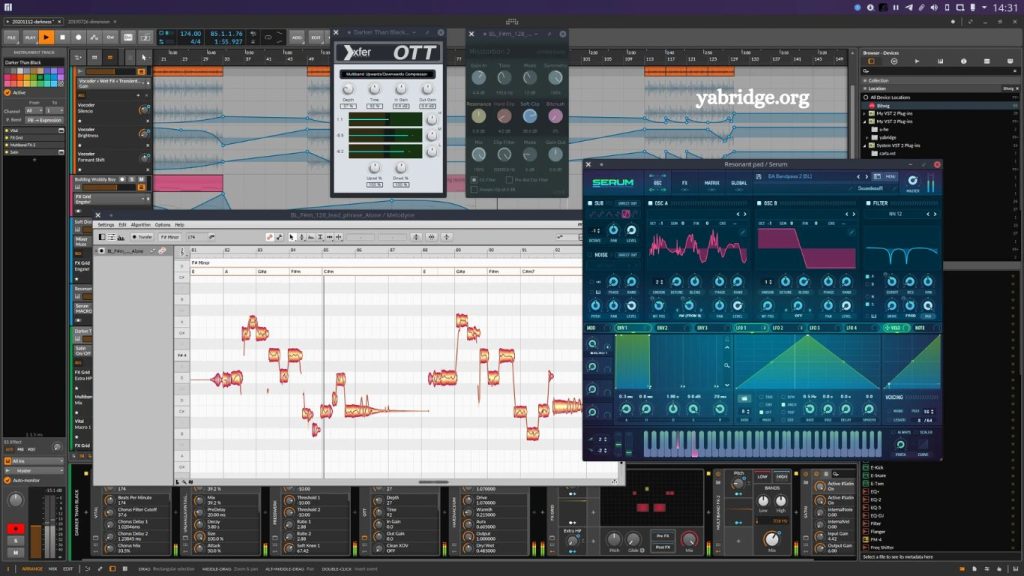
If you are a music producer or audio engineer working on Linux, you’ve probably faced one major limitation: plugin availability. While Linux has grown into a powerful platform for audio production, many high-quality VST plugins are still built exclusively for Windows. This gap often leads producers to search for compatibility solutions—and one of the most popular tools in this space is Yabridge.
In this article, we will break down what Yabridge is, how it works, what it supports, its limitations, and whether it is a reliable solution for running Windows VST plugins on Linux systems.
What Is Yabridge?
Yabridge is a compatibility layer that allows Linux users to run Windows VST2 and VST3 plugins inside Linux Digital Audio Workstations (DAWs). It acts as a bridge between Windows plugin formats and Linux audio environments using Wine (a compatibility layer that runs Windows applications on Linux).
In simple terms:
Windows VST plugin → runs through Wine → managed by Yabridge → used inside Linux DAW
Yabridge is not an emulator in the traditional sense. Instead, it translates and connects plugin communication so that Linux-based DAWs can recognize and load Windows plugin files as if they were native.
This makes it one of the most important tools for producers transitioning from Windows to Linux.
Read More: Does yabridge support VST3 Plugins?
How Yabridge Works Behind the Scenes
To understand whether Yabridge can reliably run Windows VST plugins, it helps to know what is happening under the hood.
Wine Integration
Yabridge depends heavily on Wine. Wine provides the Windows runtime environment needed for plugins to execute. Without Wine, most Windows VSTs cannot run.
Plugin Scanning and Mapping
Yabridge scans Windows VST directories and creates Linux-compatible wrappers. These wrappers allow DAWs such as:
- REAPER (Linux version)
- Bitwig Studio
- Ardour (with configuration)
to detect Windows plugins like native Linux plugins.
Real-Time Audio Communication
Audio processing must happen in real time, and Yabridge manages communication between Linux audio systems (such as JACK or PipeWire) and Windows plugin processes running inside Wine.
This is the most complex part of the system, and performance depends heavily on your setup.
Can Yabridge Really Run Windows VST Plugins on Linux?
Yes—Yabridge can run a large number of Windows VST2 and VST3 plugins on Linux with surprisingly good performance.
However, “can run” does not always mean “runs perfectly.”
What Works Well
Yabridge is known to handle:
- EQ plugins
- Compressors
- Reverbs
- Synthesizers
- MIDI effects
- Most standard VST2 plugins
Many producers report stable usage in professional sessions with DAWs such as REAPER and Bitwig Studio.
What May Not Work Smoothly
Some plugins may experience issues such as:
- GUI glitches or missing interfaces
- Crashes in heavily copy-protected plugins
- Licensing system failures (especially iLok-based plugins)
- High CPU usage in complex synths
- Incompatibility with certain VST3 edge cases
So while Yabridge is powerful, it is not a universal solution for every plugin.
System Requirements for Yabridge
To run Windows VST plugins smoothly on Linux using Yabridge, your system setup matters a lot.
Recommended Setup
- A modern Linux distribution (Ubuntu, Fedora, Arch, etc.)
- Wine installed (latest stable or staging version)
- JACK or PipeWire audio system
- A DAW that supports VST scanning
- Yabridge is installed and properly configured
Hardware Recommendations
- Multi-core CPU (Intel i5/Ryzen 5 or better)
- At least 8GB RAM (16GB recommended for large projects)
- SSD storage for plugin loading speed
Audio processing is real-time sensitive, so performance optimization is important.
Installation Overview
While installation steps vary slightly depending on your Linux distribution, the general workflow looks like this:
Step 1: Install Wine
Wine provides the Windows compatibility layer required to run plugin installers and executables.
Step 2: Install Yabridge
Yabridge is usually installed via package managers or manually from its official repository.
Step 3: Install Windows VST Plugins
Install plugins inside Wine as you would on Windows. Typically, they are placed in a Wine directory such as:
~/.wine/drive_c/Program Files/Steinberg/VstPlugins
Step 4: Configure Yabridge
Run Yabridge commands to link plugin directories and generate bridges.
Step 5: Scan Plugins in DAW
Open your DAW and rescan plugin directories. Windows VSTs should now appear.
Performance of Yabridge in Real Music Production
One of the most important questions producers ask is whether Yabridge is stable enough for real projects.
Latency
Latency depends more on JACK/PipeWire configuration than on Yabridge itself. With proper tuning, latency can be very low and suitable for live recording.
CPU Usage
Yabridge introduces a small overhead because plugins are running through Wine. However, for most modern systems, this overhead is minimal.
Stability
Stability is generally strong for mainstream plugins. Many users run full production sessions entirely on Linux using Yabridge without major issues.
Advantages of Using Yabridge
Yabridge has become popular for good reasons.
Access to a Huge Plugin Library
You are no longer limited to Linux-native plugins. You can use:
- Commercial Windows-only synths
- Industry-standard mixing tools
- Specialized audio processors
- Seamless DAW Integration
Once configured, plugins appear inside your DAW just like native Linux plugins.
Active Development
Yabridge is actively maintained, meaning compatibility continues to improve over time.
Better Than Older Solutions
Earlier tools like Carla and old Wine-VST bridges were less stable. Yabridge is significantly more modern and reliable.
Limitations of Yabridge
Despite its strengths, Yabridge is not perfect.
Not All Plugins Are Compatible
Some plugins use advanced Windows APIs or DRM systems that Wine cannot fully replicate.
No Official Vendor Support
Plugin developers do not officially support Linux through Yabridge. If something breaks, you rely on community fixes.
Complex Setup for Beginners
Configuration can be challenging for users unfamiliar with Linux audio systems.
Occasional GUI Issues
Some plugin interfaces may not render correctly or may behave unpredictably.
Yabridge vs Native Linux Plugins
While Yabridge expands your plugin access, native Linux plugins still have advantages.
| Feature | Yabridge (Windows VSTs) | Native Linux Plugins |
|---|---|---|
| Compatibility | Very high (Windows plugins) | Limited library |
| Stability | Good but variable | Very stable |
| Performance | Slight overhead | Optimized |
| Setup complexity | Moderate to high | Easy |
| Industry plugin access | Excellent | Limited |
The ideal workflow often combines both: native plugins for stability and Yabridge for specialized tools.
Is Yabridge Worth Using in 2026?
As of 2026, Linux audio production has matured significantly. Yabridge remains one of the most important tools for producers who want access to Windows-only VSTs without leaving Linux.
It is especially valuable for:
- Electronic music producers
- Sound designers
- Mixing engineers using specific Windows plugins
- Users transitioning from Windows to Linux
However, if your workflow depends heavily on copy-protected or highly complex commercial plugins, you may still encounter limitations.
Best DAWs to Use with Yabridge
Not all DAWs behave the same with Yabridge. Some offer better compatibility and stability.
REAPER (Highly Recommended)
- Excellent plugin scanning
- Lightweight and stable
- Highly configurable
Bitwig Studio
- Modern interface
- Good Linux support
- Stable VST handling
Ardour
- Strong open-source DAW
- Works well but requires setup tuning
Tips for Best Performance
To get the most out of Yabridge:
- Use PipeWire for modern audio routing
- Keep Wine updated
- Avoid unnecessary background processes
- Organize plugin folders properly
- Use SSD storage for faster loading
- Regularly rescan plugins after updates
These practices help ensure smoother performance and fewer crashes.
Frequently Asked Questions
What is Yabridge used for in Linux audio production?
Yabridge is used to run Windows VST2 and VST3 plugins on Linux by bridging them through Wine, allowing them to work in Linux DAWs.
Can Yabridge run all Windows VST plugins?
No, Yabridge supports many plugins, but not all. Some plugins with strict DRM, heavy copy protection, or complex frameworks may not work properly.
Is Yabridge stable enough for professional music production?
Yes, many producers use it in real projects. However, stability depends on the plugin, system configuration, and DAW used.
Do I need Wine to use Yabridge?
Yes, Wine is required because Yabridge relies on it to run Windows plugins on Linux.
Which DAWs work best with Yabridge?
REAPER and Bitwig Studio are among the most stable and widely used DAWs on Linux with Yabridge.
Does Yabridge increase latency in audio production?
Yabridge itself adds minimal overhead, but overall latency depends more on your audio system setup, like JACK or PipeWire.
Is Yabridge better than native Linux VST plugins?
Yabridge offers access to a much larger plugin library, while native Linux plugins are generally more stable and lightweight.
Conclusion
Yabridge provides a practical and effective way to run Windows VST plugins on Linux, significantly expanding what producers can achieve on the platform. Working through Wine provides access to a wide range of commercial and industry-standard plugins that are otherwise unavailable on Linux.