
If you produce music on Linux, you’ve probably faced one major limitation: many popular audio plugins are built only for Windows. That’s where yabridge comes in. It has become one of the most important tools for Linux musicians who want access to VST2, VST3, and other Windows audio plugins without leaving their Linux setup.
Whether you are a bedroom producer, sound designer, mixing engineer, or live performer, understanding yabridge can open the door to a much larger ecosystem of plugins and creative tools.
In this article, you’ll learn what yabridge is, how it works, why it matters, and how Linux users use it to run Windows plugins smoothly in Linux audio software.
What does yabridge mean?
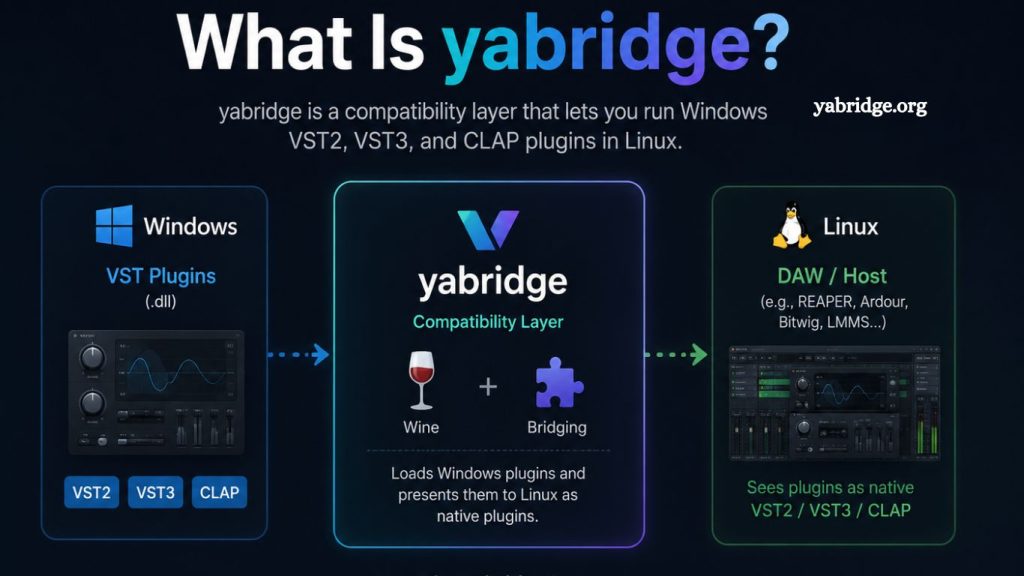
yabridge is an open-source compatibility layer that allows Linux users to run Windows VST plugins through Wine. In simple terms, it acts as a bridge between Linux music production software and Windows-based audio plugins.
Instead of dual-booting Windows or switching operating systems entirely, yabridge lets producers stay in Linux while still using many plugins designed for Windows.
Read More: What is yabridge?
This means you can load supported Windows VST2, VST3, and CLAP plugins inside Linux digital audio workstations (DAWs) such as:
- REAPER
- Bitwig Studio
- Ardour
- FL Studio running under Wine
- Waveform
For Linux audio enthusiasts, this is a breakthrough because plugin compatibility has historically been one of the biggest challenges for Linux audio.
Why was yabridge created?
Linux has long been respected for stability, customization, and performance. However, professional audio production on Linux often lagged behind Windows and macOS due to limited plugin availability.
Many major plugin developers focus primarily on Windows and macOS. As a result, Linux users often miss access to:
- Premium synthesizers
- Industry-standard mixing plugins
- Advanced mastering tools
- Specialized sound design software
- Commercial guitar amp simulators
Before yabridge, Linux users relied on complicated workarounds or unstable solutions. Running Windows plugins through Wine alone was inconsistent and difficult to manage.
yabridge simplified the process by providing a cleaner, more reliable integration layer between Wine and Linux audio environments.
How Does yabridge Work?
At its core, yabridge translates communication between Linux audio software and Windows plugins.
Here’s the basic workflow:
- A Linux DAW scans for plugins.
- yabridge exposes Windows plugins as Linux-compatible plugins.
- Wine runs the actual Windows plugin in the background.
- Audio and plugin communication pass through yabridge.
The result is that the plugin behaves almost like a native Linux plugin inside your DAW.
This architecture helps maintain:
- Plugin GUI support
- MIDI communication
- Automation handling
- Audio routing
- Preset management
For many producers, the experience feels surprisingly natural once configured properly.
What Plugin Formats Does yabridge Support?
One reason yabridge gained popularity so quickly is its broad plugin support.
It commonly supports:
- VST2 plugins
- VST3 plugins
- CLAP plugins
Some standalone Windows audio tools
This flexibility gives Linux producers access to thousands of plugins that would otherwise be unavailable.
Popular plugin brands often tested by users include:
- Native Instruments
- Arturia
- iZotope
- FabFilter
- Xfer Records
Compatibility varies depending on the plugin, Wine version, Linux distribution, and system configuration.
Why Linux Producers Love yabridge
Access to Windows-Only Plugins
This is the biggest advantage.
Many producers have invested heavily in Windows plugins over the years. yabridge allows them to continue using those tools after moving to Linux.
Instead of abandoning expensive plugin libraries, users can preserve their workflow.
Better Linux Audio Flexibility
Linux users value customization and control. yabridge fits naturally into that philosophy.
You can combine:
- Low-latency Linux kernels
- JACK or PipeWire audio systems
- Custom desktop environments
- Open-source DAWs
- Windows commercial plugins
This hybrid setup gives producers enormous flexibility.
Improved Stability Compared to Older Methods
Older bridging methods often caused crashes, graphical issues, or audio dropouts.
yabridge improved reliability significantly by focusing specifically on audio plugin integration rather than general Windows compatibility.
While no bridge is perfect, many users report stable daily production workflows using yabridge.
Open-Source Development
Because yabridge is open source, the Linux audio community actively contributes fixes, testing, and improvements.
That community-driven approach has helped the project evolve quickly while maintaining strong compatibility with evolving Linux audio environments.
Installing yabridge on Linux
The installation process depends on your Linux distribution and setup.
Generally, users install:
- Wine or Wine-Staging
- yabridge
- winetricks
- Required plugin dependencies
After installation, users scan Windows plugin folders and register them through yabridge.
Most users place their Windows plugins inside Wine directories and then synchronize them using terminal commands.
While setup is easier than with older solutions, it still requires some familiarity with Linux.
For beginners, distributions focused on multimedia production often provide the smoothest experience.
Best Linux Distributions for yabridge
Several Linux distributions are especially popular among music producers.
Common choices include:
- Ubuntu Studio
- Fedora
- Arch Linux
- Manjaro
- Pop!_OS
Each has strengths depending on your experience level and production goals.
For example:
- Ubuntu Studio is beginner-friendly.
- Arch Linux offers maximum customization.
- Fedora often includes newer packages.
- Manjaro balances convenience and flexibility.
- Common Issues with yabridge
Although yabridge is powerful, it is not flawless.
Users may encounter:
Plugin Crashes
Some plugins rely on deep Windows integrations that Wine cannot fully replicate.
Copy Protection Problems
Certain DRM systems and licensing managers may fail under Wine.
This especially affects plugins using:
- Hardware activation systems
- Kernel-level anti-tamper methods
- Proprietary installers
- GUI Glitches
Some plugins may exhibit scaling or rendering issues across desktop environments and graphics drivers.
Performance Variations
Heavy plugins may consume additional CPU resources due to translation overhead.
However, modern Linux systems often perform surprisingly well when optimized properly.
yabridge vs Carla
Another well-known Linux audio bridge is Carla.
While both tools can run Windows plugins, they approach compatibility differently.
- yabridge Strengths
- Better VST3 support
- More seamless DAW integration
- Strong Wine-focused design
- Cleaner plugin handling
- Carla Strengths
- Flexible plugin hosting
- Modular routing
- Broader experimental support
- Useful standalone features
Many advanced Linux producers actually use both depending on the situation.
Is yabridge Safe to Use?
Yes, yabridge itself is generally considered safe and trustworthy within the Linux audio community.
Because it is open source, developers and users can inspect the code openly.
However, users should still:
- Download plugins from trusted developers
- Avoid pirated software
- Keep Wine updated
- Backup production systems regularly
As with any production environment, stability depends heavily on system maintenance and plugin quality.
Who Should Use yabridge?
yabridge is ideal for:
Linux Music Producers
Anyone committed to Linux audio production but needing access to Windows plugins.
Audio Engineers Transitioning from Windows
Producers moving from Windows can maintain familiar workflows without losing plugin investments.
Open-Source Enthusiasts
Users who prefer Linux philosophy but still need commercial production tools.
Experimental Sound Designers
Creative users often combine Linux scripting power with advanced plugin ecosystems for unique workflows.
Is yabridge the Future of Linux Audio?
yabridge represents a major step forward for Linux music production.
Linux audio has improved dramatically in recent years, thanks to:
- Better DAWs
- PipeWire audio improvements
- Low-latency kernel optimizations
- Growing commercial Linux support
- Community-driven tools like yabridge
While native Linux plugins are still important, yabridge reduces one of the biggest barriers preventing producers from adopting Linux full-time.
As compatibility continues improving, Linux may become an increasingly serious option for professional studios and independent musicians alike.
Frequently Asked Questions
What is yabridge used for?
yabridge is used to run Windows VST2, VST3, and CLAP plugins on Linux through Wine inside compatible DAWs.
Is yabridge free to use?
Yes, yabridge is open-source software and completely free to download and use.
Does yabridge work with all plugins?
No, not all plugins are compatible. Most modern VST2 and VST3 plugins work, but some DRM-protected or heavily system-dependent plugins may fail.
Which DAWs support yabridge?
It works with many Linux-compatible DAWs such as REAPER, Bitwig Studio, and Ardor.
Do I need Wine to use yabridge?
Yes, yabridge relies on Wine to run Windows plugins on Linux systems.
Is yabridge stable for professional music production?
Many users report stable performance, but stability depends on plugin quality, system configuration, and Wine setup.
Can yabridge run DAWs or only plugins?
yabridge is designed only for plugins, not for running full Windows DAWs.
Conclusion
yabridge has become an essential tool for Linux-based music production by bridging the gap between Windows-only VST plugins and Linux digital audio workstations. It allows producers to maintain their existing plugin libraries while enjoying the flexibility, stability, and performance of a Linux environment.