
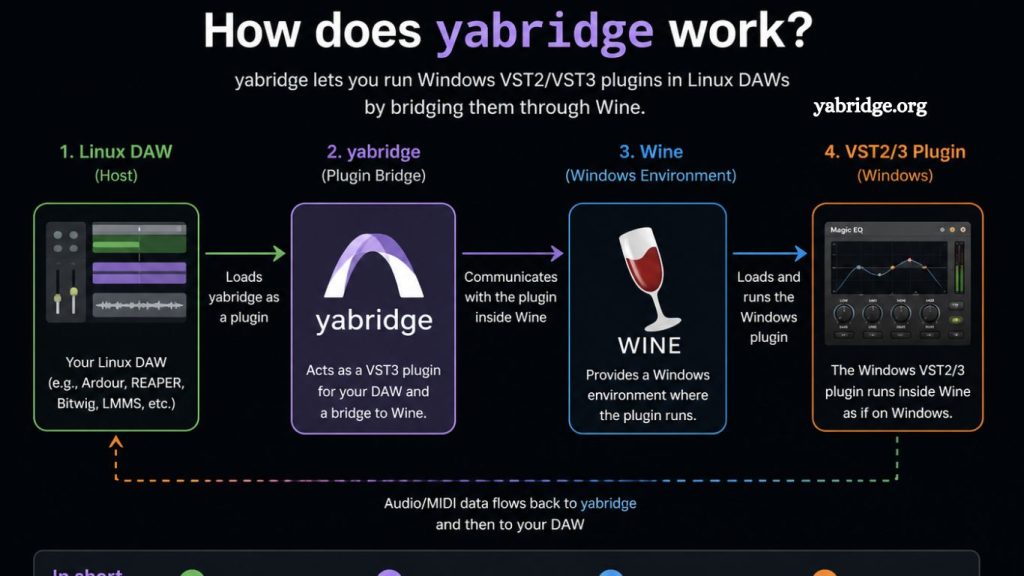
Music production on Linux has grown significantly in recent years, but one major challenge has always remained: running Windows-only audio plugins (VSTs) inside Linux digital audio workstations (DAWs). This is where yabridge becomes an essential tool.
If you have ever wondered how Yabridge works, why it is widely used, and what makes it so effective, this guide explains everything clearly and practically.
Introduction to Yabridge
Yabridge is a compatibility layer that allows Windows VST2 and VST3 plugins to run inside Linux DAWs. It acts as a bridge between Linux-based audio software and Windows plugin binaries.
In simple terms, it makes your Linux system “understand” Windows audio plugins without requiring you to leave the Linux environment or switch to Windows.
Read More: What is yabridge?
This is particularly important because many professional-grade plugins are still developed primarily for Windows and macOS.
Yabridge solves this gap by combining compatibility tools and smart communication between systems.
Why Yabridge Exists
Before delving into how Yabridge works internally, it is important to first understand the problem it solves.
Linux users often rely on DAWs such as Ardor, Bitwig Studio, or Reaper. While Linux has native plugins (LV2, LADSPA, etc.), many popular instruments and effects are only available in VST format, designed for Windows.
Without a compatibility layer, these plugins cannot run on Linux.
Earlier solutions included:
- JACK and Carla plugin bridges
- Manual Wine setups
- Heavy virtualization tools
However, these approaches were often unstable, slow, or difficult to configure.
Yabridge was designed to provide:
- Better stability
- Easier setup
- Improved performance
- Native-feeling integration inside DAWs
Core Technology Behind Yabridge
To understand how Yabridge works, you need to understand three main components:
Wine Compatibility Layer
At the foundation of Yabridge is Wine, a compatibility layer that allows Windows applications to run on Linux.
Wine does not emulate Windows. Instead, it translates Windows system calls into Linux-compatible operations in real time.
Yabridge uses Wine to load and execute Windows VST plugin files (.dll files).
Yabridge Bridge System
Yabridge itself acts as a bridge between:
- Linux DAW (host environment)
- Windows VST plugin (running through Wine)
Instead of loading plugins directly inside the DAW, Yabridge creates a proxy system.
Plugin Proxy Architecture
Yabridge splits plugin execution into two parts:
A. Plugin Host (Linux Side)
The DAW sees a normal Linux plugin interface.
B. Plugin Backend (Wine Side)
The actual Windows plugin runs inside Wine in a separate process.
These two parts communicate via a fast local communication channel (IPC, Inter-Process Communication).
How Yabridge Works Step by Step
Let’s break down what happens when you load a Windows plugin in your DAW using Yabridge.
Step 1: Plugin Scanning
When your DAW starts, Yabridge scans configured plugin directories.
It identifies Windows VST plugins (.dll files) and prepares them for mapping.
It then creates Linux-compatible “wrapper” plugins that your DAW can detect.
Step 2: Plugin Registration in DAW
Your DAW does not directly see the Windows plugin.
Instead, it sees a Linux-native proxy plugin created by Yabridge.
From the DAW’s perspective, it looks like a normal plugin.
Step 3: Plugin Launch Through Wine
When you open the plugin inside your DAW:
- Yabridge launches a Wine process
- The actual Windows plugin loads inside Wine
- The plugin runs as if it were on a Windows system
Step 4: Communication Between DAW and Plugin
This is the most important part of how Yabridge works.
The DAW and the plugin communicate using a high-performance bridge system:
- Audio data is streamed in real time
- MIDI signals are transmitted instantly
- Parameter changes are synchronized continuously
Yabridge ensures low-latency communication, so the plugin behaves like a native Linux plugin.
Step 5: Real-Time Synchronization
Any changes made in the DAW interface are reflected immediately in the plugin.
For example:
- Turning a knob in your DAW updates the plugin
- Automation curves are transmitted instantly
- Preset changes sync without delay
This creates a seamless user experience.
Why Yabridge Performs Better Than Older Methods
Yabridge is widely considered one of the most efficient VST bridging solutions for Linux. Here’s why:
Multi-Process Isolation
Each plugin runs in its own isolated Wine process.
This means:
- A crash in one plugin does not affect the entire DAW
- Stability is significantly improved
Reduced Latency
Yabridge uses optimized IPC channels for communication.
This reduces delays between:
- MIDI input
- Audio output
- GUI interaction
Native Plugin Detection
Unlike manual Wine setups, Yabridge automatically exposes plugins to DAWs as if they were native Linux plugins.
This removes the need for manual configuration in most cases.
VST3 and VST2 Support
Yabridge supports both major plugin formats:
- VST2 (older but widely used)
- VST3 (modern standard)
This broad compatibility makes it suitable for professional workflows.
Installation Overview (Conceptual)
While this article is not a setup guide, understanding how Yabridge is typically installed helps explain its structure.
Generally, users:
- Install Wine on Linux
- Install Yabridge binaries
- Configure plugin directories
- Run the Yabridge sync tool
- Scan plugins in DAW
After setup, plugins appear automatically inside supported DAWs.
Key Components Inside Yabridge Architecture
To better understand how Yabridge works internally, let’s break down its structure.
yabridge-host
This is the Linux-side plugin wrapper that the DAW interacts with.
yabridge-plugin-server
This runs inside Wine and loads the actual Windows VST plugin.
IPC Layer
A communication layer that transfers:
- Audio buffers
- MIDI messages
- Plugin parameters
- Automation data
This layer is optimized for real-time performance.
Audio and MIDI Flow in Yabridge
Understanding the signal flow helps clarify the system:
- MIDI input enters DAW
- DAW sends MIDI to the Yabridge host
- Host forwards data to the Wine process
- Windows plugin processes audio
- Audio output is sent back to the DAW
This loop happens continuously with very low delay.
Performance Considerations
While Yabridge is highly efficient, performance depends on:
CPU Usage
Each plugin runs in a separate process otsoCPU load may increase with heavy projects.
RAM Usage
Wine processes consume memory for each active plugin.
System Optimization
Linux audio performance depends on:
- JACK or PipeWire configuration
- Real-time kernel settings
- Buffer size adjustments
Proper tuning ensures smooth performance.
Advantages of Yabridge
Yabridge provides several advantages for producers:
- Access to a huge library of Windows-only plugins
- Stable performance on Linux
- Easy plugin management
- Professional-level audio workflow compatibility
- Seamless integration with modern DAWs
Limitations of Yabridge
Despite its strengths, Yabridge has some limitations:
Dependency on Wine
Since it relies on Wine, compatibility is not perfect for every plugin.
GUI Rendering Issues
Some plugin interfaces may not display correctly depending on the graphics setup.
Not Fully Native
It still runs Windows binaries, which may not match native Linux performance in all cases.
Practical Use Cases
Yabridge is widely used in:
- Music production studios on Linux
- Sound design workflows
- Mixing and mastering setups
- Electronic music production
- Experimental audio environments
It is especially valuable for producers transitioning from Windows to Linux.
Frequently Asked Questions
What is Yabridge used for?
Yabridge is used to run Windows VST2 and VST3 audio plugins inside Linux digital audio workstations by acting as a compatibility bridge.
Does Yabridge use Wine?
Yes, Yabridge relies on Wine to execute Windows plugin files on Linux while handling communication between the plugin and DAW.
Is Yabridge difficult to set up?
Setup is generally straightforward for users familiar with Linux audio tools, requiring the installation of Wine, plugin configuration, and a simple sync process.
Does Yabridge affect audio latency?
Yabridge is optimized for low latency, but actual performance depends on system configuration, buffer size, and audio server setup.
Can Yabridge run all Windows VST plugins?
Not all plugins are guaranteed to work perfectly, but most modern VST2 and VST3 plugins run reliably through Yabridge and Wine.
Is Yabridge better than other Linux plugin bridges?
Many users prefer Yabridge due to its stability, simpler configuration, and better performance compared to older or manual Wine-based methods.
What DAWs support Yabridge?
Yabridge works with most Linux-compatible DAWs, including Bitwig Studio, Reaper, and other hosts that support VST plugins.
Conclusion
Yabridge provides a practical and efficient solution for running Windows VST plugins on Linux systems. Combining Wine for Windows compatibility with a lightweight bridging layer enables seamless communication between Linux-based DAWs and Windows plugin formats without requiring complex virtualization or dual-boot setups.