
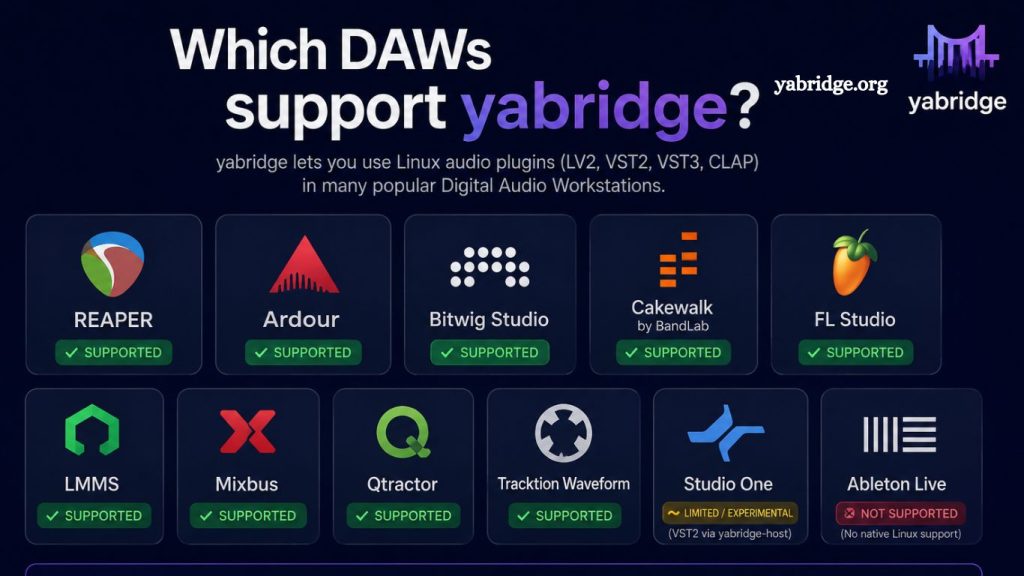
Which DAWs Support yabridge remains a key question for Linux music producers who want access to Windows VST plugins inside their digital audio workstation. yabridge itself is not tied to any single DAW but functions as a compatibility bridge that enables VST2 and VST3 plugins to run through Wine on Linux systems. Because of this design, the focus is not on direct DAW support but on plugin compatibility and stability within the DAW environment.
Popular Linux-compatible DAWs such as REAPER, Bitwig Studio, Ardor, and Waveform are commonly used with yabridge for their reliable VST support. Understanding how each DAW manages plugins helps producers build a stable workflow, reduce technical issues, and fully utilize Windows-based audio tools within a Linux production setup for professional music creation.
Which DAWs actually support yabridge?
The answer is not as simple as listing a few names. yabridge is not a DAW-specific plugin system—it operates at the compatibility layer. That means its usability depends more on the DAW’s plugin format support and how well it integrates with Wine-based VST bridging.
In this article, we will break down everything you need to know about DAW compatibility with yabridge, including which DAWs work best, what requirements matter, and how to choose the right setup for your workflow.
Read More: Is yabridge Free and Open Source?
Understanding yabridge in a DAW Context
Before looking at DAWs, it is important to understand what yabridge actually does.
yabridge (Yet Another Bridge) is a Linux compatibility tool that allows Windows VST2 and VST3 plugins to run inside Linux DAWs. It works by:
- Running Windows VST plugins through Wine
- Bridging them into native Linux VST formats
- Making them appear as standard plugins inside your DAW
This means yabridge is not tied to a specific DAW. Instead, it depends on:
- Whether the DAW supports VST2 or VST3 plugins
- Whether the DAW runs natively on Linux or via Wine
- Whether the DAW can scan and load bridged plugins properly
So the real question becomes:
Which DAWs support VST plugins well enough to work with yabridge on Linux?
Key Requirements for DAW Compatibility with yabridge
Not every DAW behaves the same way with plugin bridging tools. To ensure smooth operation with yabridge, a DAW should meet the following conditions:
Linux Compatibility
Native Linux DAWs are the most stable option. These include:
- Native Linux builds
- Proper JACK or PipeWire audio support
- Stable plugin scanning systems
VST Support (VST2 or VST3)
yabridge works by exposing Windows VST plugins as Linux VSTs. Therefore, your DAW must support:
- VST2 (still widely used)
- VST3 (modern standard)
Plugin Rescan System
DAWs that allow manual plugin rescanning or directory control make yabridge integration easier.
Stability with Wine-Based Plugins
Some DAWs handle Wine-bridged plugins better than others. Stability is critical for real-time audio work.
Best DAWs That Support yabridge
Now, let’s explore the most compatible and widely used DAWs for yabridge users on Linux.
REAPER — Highly Flexible and Widely Used with yabridge
REAPER is one of the most popular DAWs among Linux producers using yabridge.
- Why REAPER works well:
- Native Linux version available
- Excellent VST2 and VST3 support
- Lightweight and highly customizable
- Strong plugin scanning system
- Stable performance with Wine-bridged plugins
yabridge compatibility:
REAPER is often considered one of the most reliable environments for yabridge because it handles plugin bridging cleanly and allows easy rescanning when new plugins are added.
- Best use cases:
- Professional music production
- Sound design
- Mixing and mastering
- Custom routing setups
REAPER’s flexibility makes it a top-tier choice for hybrid plugin environments.
Bitwig Studio — Modern Workflow with Strong Linux Support
Bitwig Studio is another leading DAW that runs natively on Linux and is frequently used with yabridge.
- Why Bitwig works well:
- Native Linux support
- Advanced modular workflow (The Grid)
- Excellent MIDI and automation tools
- Stable plugin sandboxing
yabridge compatibility:
Bitwig handles VST plugins efficiently, and yabridge integrates smoothly because Bitwig is designed with cross-platform consistency in mind.
- Strengths:
- Electronic music production
- Sound design experimentation
- Live performance setups
Bitwig is especially appealing for producers who want a modern, creative environment with strong Linux support.
Ardor — Open Source Power with Plugin Flexibility
Ardoris is a well-established open-source DAW that snatively natively supports Linux
- Why Ardor works with yabridge:
- Native Linux-first design
- Supports VST2/VST3 via plugins
- Deep routing and recording features
- Open-source flexibility
yabridge compatibility:
Ardor works with yabridge through its VST plugin support layer. While setup may require more configuration compared to commercial DAWs, it is fully capable of handling bridged plugins.
- Best use cases:
- Recording studios
- Audio engineering
- Film and post-production work
Ardoris is ideal for users who prefer the open-source ecosystem and deep audio control.
Tracktion Waveform — Efficient and Plugin-Friendly Workflow
Waveform by Tracktion is another Linux-compatible DAW that supports VST plugins and works with yabridge.
- Why Waveform works well:
- Native Linux version available
- Flexible plugin management
- Minimal system overhead
- Modern UI design
yabridge compatibility:
Waveform integrates well with bridged plugins, especially when using properly configured VST directories managed by yabridge.
- Best use cases:
- Beat making
- Independent music production
- Fast workflow environments
Waveform is particularly attractive for producers who want a clean and efficient interface.
Renoise — Tracker-Based DAW with Strong Plugin Support
Renoise is a unique tracker-style DAW that also runs on Linux and supports VST plugins.
- Why Renoise works with yabridge:
- Native Linux build available
- Excellent VST handling
- Lightweight and fast performance
- Unique pattern-based workflow
yabridge compatibility:
Renoise works well with yabridge when configured correctly, especially for users who rely heavily on sample-based production.
- Best use cases:
- Electronic music production
- Chiptune and experimental genres
- Sample-heavy compositions
Renoise stands out due to its unconventional workflow and efficiency.
Other DAWs That May Work with yabridge
While the DAWs above are the most common choices, several others can also work depending on setup:
LMMS
- Linux-native but limited VST support
- Can work with yabridge through external configuration
- Best for beginners or lightweight production
Mixbus
- Built on the Ardor engine
- Linux-compatible
- Works with VST plugins via system configuration
- Windows DAWs via Wine (Not Recommended)
Some users attempt to run DAWs like Ableton Live or FL Studio on Linux using Wine. While yabridge can technically work in these environments, stability is inconsistent and not ideal for production.
Does yabridge Work with all DAWs?
Technically, yabridge is not restricted to any DAW. Instead, compatibility depends on:
- Plugin format support (VST2/VST3)
- Linux system configuration
- Wine version stability
- DAW’s plugin scanning behavior
This means:
- A DAW does not need special “yabridge support.”
- It only needs to properly load VST plugins on Linux
- The plugin bridge handles the rest
In other words, yabridge is DAW-agnostic.
Common Issues and Compatibility Tips
Even with a compatible DAW, users may encounter setup challenges. Here are common considerations:
Plugin Not Showing in DAW
- Ensure yabridge has synced plugins correctly
- Run plugin scan inside DAW
- Check VST directories
Crashes or Instability
- Verify Wine version compatibility
- Update yabridge to the latest release
- Avoid mixing 32-bit and 64-bit plugins
Audio Latency Problems
- Use JACK or PipeWire correctly
- Adjust buffer size settings
- Optimize CPU performance settings in DAW
- Best Overall DAW Choices for yabridge
If we summarize practical usage:
- Best overall stability: REAPER
- Best modern workflow: Bitwig Studio
- Best open-source option: Ardor
- Best lightweight workflow: Waveform
- Best experimental tracker style: Renoise
Each DAW supports yabridge indirectly through VST compatibility rather than direct integration.
Frequently Asked Questions
What is yabridge used for?
yabridge is used to run Windows VST2 and VST3 plugins on Linux-based digital audio workstations by emulating Wine.
Do all DAWs support yabridge?
No DAWs directly “support” yabridge. Instead, yabridge works with any DAW that properly supports VST plugins on Linux.
Which DAW works best with yabridge?
REAPER is widely considered the most stable and flexible DAW for yabridge users.
Can I use yabridge with Bitwig Studio?
Yes, Bitwig Studio works smoothly with yabridge and handles VST plugins efficiently on Linux.
Is yabridge compatible with open-source DAWs?
Yes, DAWs like Ardor and LMMS can work with yabridge depending on the configuration.
Why are some plugins not showing in my DAW?
This usually happens if yabridge hasn’t synced correctly, the plugin path is missing, or the DAW hasn’t rescanned its VST directories.
Is yabridge stable for professional music production?
Yes, when properly configured with a compatible DAW and stable Wine setup, yabridge is reliable enough for professional audio production workflows.
Conclusion
yabridge has become an essential solution for Linux music producers who rely on Windows-only VST plugins. While it does not directly “support” any specific DAW, its performance depends heavily on how well a DAW handles VST2 and VST3 plugins within a Linux environment.